.d.ts
Why .d.ts file is used? when to use?
When to use
- Type declaration
- Use javascript library in typescript
.d.ts file doesn't generate .js file
Why to use?
Many packages are written by javascript.
If package wouldn't have type definition file
We can use it and find type in typescript project
.d.ts file allow using a package with type on typescript project even though that package is written by javascript.
Contents
Almost of all codes which are consists of namespace, interface, type, and method signature.
How to use?
Show you axios example index.d.ts
You can find this on node_modules/axios
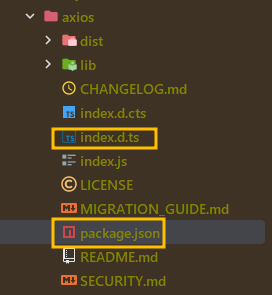
- index.d.ts
- axios.test.ts
interface AxiosResponse<T = any, D = any>  {
    data: T;
    status: number;
    statusText: string;
    headers: RawAxiosResponseHeaders | AxiosResponseHeaders;
    config: InternalAxiosRequestConfig<D>;
    request?: any;
}

export type Method =
    | 'get' | 'GET'
    | 'delete' | 'DELETE'
    | 'head' | 'HEAD'
    | 'options' | 'OPTIONS'
    | 'post' | 'POST'
    | 'put' | 'PUT'
    | 'patch' | 'PATCH'
    | 'purge' | 'PURGE'
    | 'link' | 'LINK'
    | 'unlink' | 'UNLINK';

// ..

declare const axios: AxiosStatic;

export default axios;
.d.ts file already exists on 'axios' (index.d.ts)
So we don't need additional tasks when to use this.
import axios, {AxiosResponse} from 'axios'

// package.json tells typescript where to find the types from module.
// So we can find type declaration.
axios.get('https://localhost:8080')
    // AxiosResponse type is provided by index.d.ts
    .then((res: AxiosResponse) =>{
        console.log(res.status)
    })
How typescript compiler know type of any module?
![axios package.json]
In package.json, in there types is defined.
package.json
In axios, type is defined as shown below.
So, we don't need to install @types/axios module for typescript project.
{
  "name": "axios",
  "version": "1.3.4",
  "description": "Promise based HTTP client for the browser and node.js",
  "main": "index.js",
// ..
  },
  "type": "module",
  "types": "index.d.ts", // ✅ Let tsc know type from axios package.
}
If the package doesn't have .d.ts file , you have to add @types/${package-name} on package.json (normally the name of which is index.d.ts)
Also, if @types/* not exists too? and then you should create .d.ts for using it with type in typescript project.
Advantage
- comes with its advantage
- Generic + interface => TSC infer type flexibly
AxiosResponseType.test.ts
import axios, {AxiosResponse} from 'axios'

interface User {
    id: number
    name: string
    email: string
    address: {
        street: string
        suite: string
        city: string
        zipcode: string
        geo: {
            lat: string
            lng: string
        }
    },
    phone: string
    website: string
    company: {
        name: string
        catchPhrase: string
        bs: string
    }
}

axios
    // get<T = any, R = axios.AxiosResponse<T>, D = any>(url: string, config?: axios.AxiosRequestConfig<D>): Promise<R>;
    // T: User => R: AxiosResponse<User
    .get<User>('https://jsonplaceholder.typicode.com/users/1')
    .then((res)=>{
        // user's type is interpreted as User
        const user = res.data
        console.dir(user)
    })
    .catch(console.error)

axios
    .get('https://jsonplaceholder.typicode.com/users')
    .then((res: AxiosResponse<User[]>)=>{
        // user's type is interpreted as User
        // Typescript anticipate response data type is User[]
        const users = res.data
        console.dir(users)
    })
    .catch(console.error)
})
Tips
If index.d.ts file doesn't exist, you could find @types/{package-name} on DefinitelyTyped github.